![CZT [CITI-ZEN-THEORY]](http://czt.rocks/cdn/shop/files/CZT_-_Brand_PINK_Label_1_330x.png?v=1774104725)
![CZT [CITI-ZEN-THEORY]](http://czt.rocks/cdn/shop/t/61/assets/CZT-Fast-Logo---Blue-Grey_330x.png?v=98224836737033641471695502660)
![CZT [CITI-ZEN-THEORY]](http://czt.rocks/cdn/shop/files/CZT_-_Brand_PINK_Label_1_170x.png?v=1774104725)
![CZT [CITI-ZEN-THEORY]](http://czt.rocks/cdn/shop/t/61/assets/CZT-Fast-Logo---Blue-Grey_170x.png?v=98224836737033641471695502660)
DTF vs Screen Printing: Which Method Is Right for You?
For small runs and full-color detail, choose DTF; for high-volume, spot-color work where durability and cost efficiency matter most, screen printing earns its place. That single distinction, grounded in order-size economics and design complexity, shapes nearly every practical decision a small brand or ecommerce seller will face.
- Choose DTF when your order is under roughly 24 units, your artwork includes gradients or photographic detail, or you’re printing on mixed fabrics and need on-demand flexibility.
- Choose screen printing when you’re ordering 100+ units of a simple, bold design and need the highest wash durability and Pantone-accurate color consistency.
Your immediate next step: order a DTF sample transfer on your target fabric, or contact a screen printer for a setup quote on your specific color count.
Key Takeaways
DTF wins for small runs and complex artwork; screen printing wins for high-volume, simple designs where per-unit cost and wash durability at 50–100+ cycles justify the setup investment.
| Point | Details |
|---|---|
| Order-size breakpoint | Under 24 units, DTF is almost always cheaper; over 100 units with simple art, screen printing pulls ahead. |
| Durability range | Premium DTF reaches 50+ washes; budget DTF can fail at 10–15; plastisol screen print commonly hits 50–100+ washes. |
| Color complexity rule | Photographic or gradient-heavy art favors DTF at any quantity; 1–4 spot colors favor screen printing at scale. |
| Recycled fabric testing | Always run an adhesion and colorfastness test on rPET or recycled cotton before committing to a production run. |
| Hybrid strategy | Sample and short-run in DTF, then migrate to screen printing once a design proves profitable at volume. |
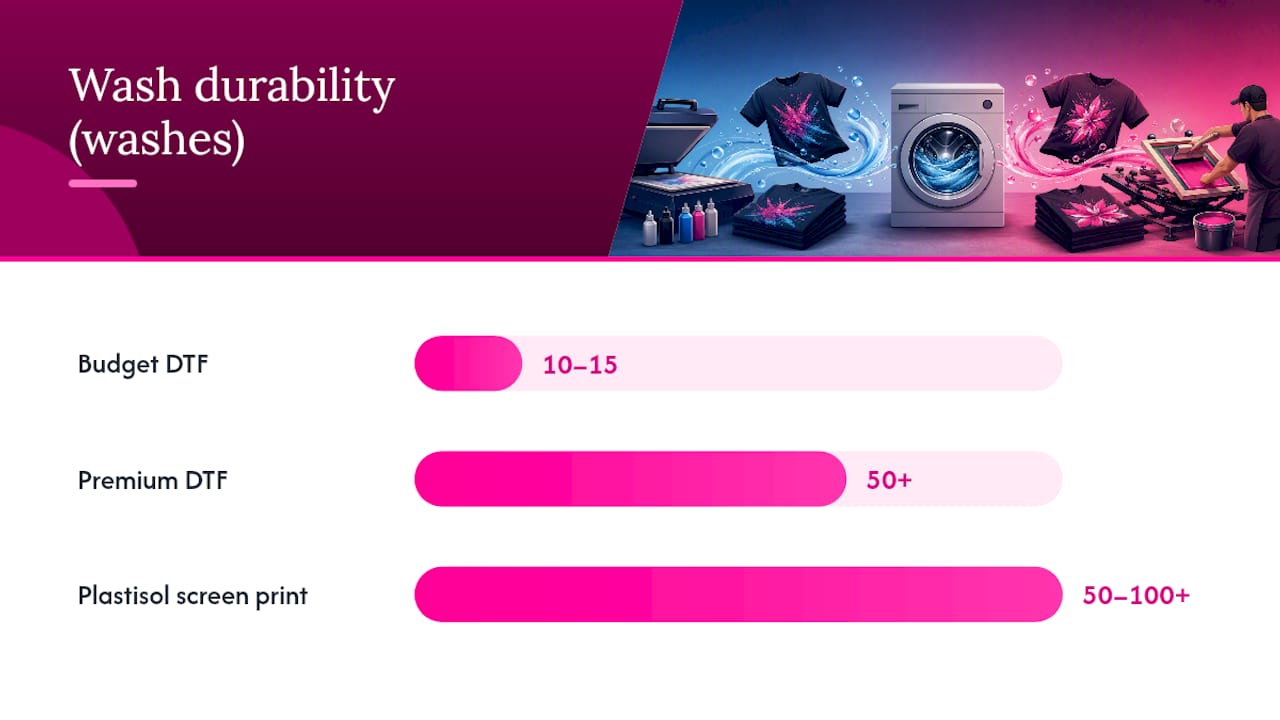
Table of Contents
- How Does DTF vs Screen Print Actually Compare?
- How DTF Printing Works: Process, Materials, and Setup
- How Screen Printing Works: Process, Inks, and Specialty Finishes
- How Do Quality, Durability, and Fabric Compatibility Compare?
- Which Method Should You Choose? A Practical Decision Guide
- What Do DTF and Screen Printing Actually Cost?
- Shop Operations: Maintenance, Workspace, and Scaling
- Sustainability and Recycled Fabrics: What You Need to Know
- Czt’s Perspective: Choosing the Method That Honors the Fabric
- Sources
How Does DTF vs Screen Print Actually Compare?
The table below maps both methods across the dimensions that matter most to small brands and ecommerce sellers. DTF is faster to set up and excels for small and on-demand runs, while screen printing remains more efficient and cost-effective at volume.
Order-size breakpoints
These three bands give you a practical starting point before you run detailed quotes:
-
1–20 units: DTF wins on price and setup speed almost every time.
-
20–100 units: A genuine decision zone. Design complexity tips the balance. Multi-color photographic work still favors DTF; a two-color logo starts favoring screen printing around 48–72 units.
-
100+ units: Screen printing pulls ahead for simple artwork. The setup cost is fully amortized, and per-unit ink cost drops sharply.
How DTF Printing Works: Process, Materials, and Setup
Direct-to-film printing, the industry term for what most people call DTF, transfers a printed ink layer from a PET film carrier onto fabric using heat and a hot-melt adhesive powder. The process is operationally lean, which is precisely why it suits small-batch and on-demand production so well.
The DTF workflow step by step
- Artwork preparation: Process your design through RIP (Raster Image Processing) software, which separates the image into CMYK layers and generates a white underbase channel. The white layer is critical for opacity on dark garments.
- Print to PET film: The DTF printer lays down CMYK color first, then floods the white ink on top, building a mirror image on the film.
- Apply adhesive powder: While the ink is still wet, hot-melt adhesive powder is applied evenly across the printed surface. Excess powder is shaken off.
- Cure the transfer: The powdered film passes through a curing oven or under a heat press at roughly 250–320°F, melting the adhesive into the ink layer and creating a unified transfer.
- Heat-press to garment: The cured transfer is placed ink-side down on the garment and pressed at around 300–320°F for 10–15 seconds.
- Peel and second press: Cold-peel transfers are peeled after the film cools; hot-peel transfers release immediately. A second press with a silicone sheet or parchment paper improves adhesion and softens the hand feel.
Equipment and consumables to budget for
Your core DTF setup includes a DTF-capable inkjet printer (entry-level models start around $2,000; production units run $8,000–$15,000+), PET film rolls, pigment-based CMYK and white inks, hot-melt adhesive powder, and a heat press or dedicated curing oven. Film grade and powder quality are the two variables most operators underestimate. Coarser powder creates a stiffer, more visible film edge; finer powder produces a softer, more retail-grade finish.
Moisture contamination weakens the film-to-fabric bond and accelerates edge-lift, turning a 50-wash transfer into a 15-wash one.*
How Screen Printing Works: Process, Inks, and Specialty Finishes
Screen printing forces ink through a mesh stencil onto the garment surface, building up a layer of color that bonds directly to the fabric fibers. The process is older, more labor-intensive at setup, and deeply rewarding at scale, where its cost and durability advantages become undeniable. For a detailed operational walkthrough, Czt’s guide to the screen printing process covers equipment and workflow in depth.
The screen printing workflow step by step
- Artwork separation: Each color in the design is separated into its own film positive. A four-color design requires four films, four screens, and four ink passes.
- Screen burning: Each film positive is exposed onto a mesh screen coated with light-sensitive emulsion. UV light hardens the emulsion everywhere except the design area, creating the stencil.
- Press setup: Screens are registered on the press, ink is loaded, and a test print is pulled to confirm alignment. This setup phase is where the time and cost live.
- Printing: Ink is pushed through the mesh with a squeegee, depositing a precise layer of color onto the garment. Multi-color designs require a separate pass for each color.
- Flash cure between colors: A flash dryer partially cures each ink layer before the next color is applied, preventing bleed and maintaining registration.
- Final cure: Finished garments pass through a conveyor dryer or tunnel oven, fully curing the ink to the fabric.
Ink families and specialty finishes
Screen printing’s material palette is one of its most compelling advantages. Plastisol ink is the industry workhorse: opaque, durable, and forgiving to cure. Water-based and discharge inks penetrate the fabric fibers rather than sitting on top, producing a softer, almost vintage hand feel. Beyond those foundations, screen printing supports specialty effects including puff ink (raised, three-dimensional texture), metallic and foil finishes, and Pantone-matched spot colors that DTF simply cannot replicate with the same precision.
- Plastisol: Highest durability, opaque on dark garments, slightly heavier feel.
- Discharge: Removes dye from the fabric and replaces it with pigment; produces the softest possible hand feel, but works only on reactive-dyed cotton.
- Water-based: Eco-friendlier chemistry, softer than plastisol, slightly less opaque.
- Specialty (puff, metallic, foil): Require additional equipment or post-press steps; add cost but create tactile and visual effects unavailable in DTF.
How Do Quality, Durability, and Fabric Compatibility Compare?
This is where the DTF vs screen printing comparison gets genuinely nuanced, because the answer changes depending on your supplies, your technique, and the fabric you’re printing on.
Print quality and color accuracy
| Quality Axis | DTF | Screen Printing |
|---|---|---|
| Photographic detail | Excellent | Limited (halftone dots) |
| Gradient reproduction | Seamless | Requires simulated process or halftones |
| Spot-color accuracy | Good approximation | Exact Pantone matching possible |
| Opacity on dark garments | Strong (built-in white underbase) | Excellent with underbase pass |
| Fine line / small text | Very good | Excellent at larger sizes; can break down at fine detail |
DTF handles photographic images and gradients without per-color setup, which is a genuine compositional freedom that screen printing cannot match at small quantities. Screen printing, by contrast, delivers exact Pantone color matching for brand-accurate corporate merchandise, a requirement that matters enormously for retail licensing and team uniforms.
Durability and wash resistance
Premium DTF transfers can deliver roughly 50+ wash cycles, while budget supplies or poor technique may fail after 10–15 washes. Screen printing with plastisol ink commonly reaches high durability with proper curing. The gap between “budget” and “retail-grade” DTF outcomes comes down to material choice, adhesive quality, curing profile, and whether a second press is used. Durability is controllable, not fixed.
Pro Tip: Always wash-test a sample before committing to a production run. Turn garments inside out, use cold water, and avoid high-heat drying. These three habits extend print life regardless of method.
Hand feel and texture
DTF produces a soft, thin film layer that most wearers find comfortable, especially compared with heavy plastisol screen prints. DTF typically delivers a softer-feeling finished layer than some plastisol screen prints, though discharge and water-based screen inks can feel even softer because they become part of the fabric rather than sitting on top. For a vintage, worn-in aesthetic, discharge screen printing is still the gold standard.
Fabric compatibility
- Cotton (100%): Both methods perform well. Screen printing’s discharge inks require reactive-dyed cotton specifically.
- Polyester and performance fabrics: DTF handles polyester reliably. Screen printing on polyester risks dye migration, where the fabric’s dye bleeds into the ink layer during curing.
- Cotton-poly blends: Both work; DTF is more forgiving on higher-poly blends.
- Recycled fibers (rPET, recycled cotton): DTF adheres well to recycled polyester blends. Screen printing on recycled cotton performs similarly to virgin cotton, though fiber irregularities can affect ink coverage. Always run an adhesion test on any recycled-fiber substrate before production.
- Non-textile surfaces (bags, hats, rigid items): DTF transfers can apply to almost any heat-tolerant surface. Screen printing requires a flat, printable surface and is less versatile for irregular shapes.
For readers weighing durable fabrics for active and youth apparel, fabric construction affects print adhesion as much as the printing method itself.
Which Method Should You Choose? A Practical Decision Guide
Before you place an order, run through this checklist. Each answer narrows your options quickly.
Pre-order checklist
- Order size: Under 24 units? DTF. Over 100 units with a simple design? Screen printing. Between 24–100 units? Read on.
- Artwork complexity: Photographic, gradient-heavy, or more than six colors? DTF. Bold, 1–4 spot colors? Screen printing.
- Fabric type: Polyester-heavy or mixed-substrate run? DTF. 100% cotton with a need for discharge softness? Screen printing.
- Durability requirement: Retail-grade, 50+ wash expectation? Either method with premium materials. Budget run where longevity is secondary? DTF for speed.
- Turnaround time: Need prints in 24–48 hours? DTF. Can you wait 5–10 business days for setup? Screen printing.
- Budget per unit: Tight per-unit budget on a large run? Screen printing. Tight total budget on a small run? DTF.
Decision flow for common scenarios
- E-commerce small-batch (1–20 units, varied designs): DTF every time. No setup cost, no minimum order, and full-color artwork ships the same week.
- Event shirts (50–200 units, 1–2 color logo): Screen printing. Setup cost amortizes quickly, and plastisol durability holds up through repeated washes.
- Team uniforms (24–72 units, Pantone-matched logo): Screen printing for exact color accuracy; DTF if turnaround is under 48 hours and color approximation is acceptable.
- Retail seasonal run (100–500 units, bold graphic): Screen printing. Per-unit cost drops significantly, and the tactile quality of a well-cured plastisol or discharge print reads as premium on the rack.
- Mixed-design on-demand store: DTF. No screens to burn, no minimum per design, and you can offer unlimited colorways without repricing.
Red flags when evaluating suppliers
- Supplier cannot specify film grade or adhesive powder source.
- No second-press step in the DTF workflow.
- Screen printer cannot confirm conveyor oven temperature calibration.
- No wash-test samples available before production approval.
- Vague color-matching process, with no Pantone reference system.
For deeper guidance on preparing artwork for either method, file resolution and color mode matter as much as the printing technique itself.
What Do DTF and Screen Printing Actually Cost?
Cost is where the DTF vs screen printing decision becomes concrete. Quantity is usually the dominant cost factor: under about 24 units DTF commonly wins on price; between roughly 48–72 units there’s a close decision zone; past that, screen printing often pulls ahead for simple artwork.
Startup and equipment costs
Per-unit cost and break-even examples
Scenario A: Simple two-color logo on 50 white tees. DTF per-unit cost runs higher because there’s no setup amortization benefit at this quantity. Screen printing’s two-screen setup cost spreads across 50 units, making it competitive or cheaper per shirt. For simple 1–2 color logos, the crossover point where screen printing becomes cheaper often falls in the dozens to low hundreds of units.
Scenario B: Full-color photographic graphic on 15 black hoodies. DTF wins decisively. Screen printing a photographic image requires simulated process printing with six or more screens, making setup cost prohibitive at 15 units. DTF handles the full image in one pass with no per-color penalty.
Timeline from artwork to finished garment
- DTF small run (1–20 units): Artwork prep 1–2 hours, printing and curing 2–4 hours, total turnaround 1–2 business days in-house; 3–5 days outsourced.
- Screen printing small run (24–50 units): Artwork separation and screen burning 1–2 days, press setup and printing 2–4 hours, cure and fold 1 day, total 3–7 business days.
- Screen printing large run (200+ units): Similar setup time, but production throughput on an automatic carousel can reach hundreds of units per hour, compressing total time despite the longer setup.
For readers managing budget-conscious custom clothing projects, timeline and per-unit cost interact directly with cash flow, especially for pre-order or crowdfunded collections.
Shop Operations: Maintenance, Workspace, and Scaling
Running either method in-house demands honest self-assessment of your workspace, your maintenance discipline, and your production volume.
DTF printer maintenance
DTF printers are inkjet-based and share the same vulnerability as all inkjet systems: clogged print heads. White ink, which is pigment-heavy and prone to settling, requires daily circulation or purging if the machine sits idle. A neglected DTF printer can develop permanent head damage within days. Maintenance tasks include daily nozzle checks, weekly head cleanings, and monthly deep cleans of the ink circulation system.
Screen printing press maintenance
Screen printing equipment is mechanically simpler but chemically demanding. Screens must be reclaimed after each job using emulsion remover and pressure washing. Mesh tension degrades over time and must be checked with a tension meter. Conveyor dryer temperature calibration is critical: under-cured plastisol washes out; over-cured ink cracks. A well-maintained manual press can run for decades; an automatic carousel requires more rigorous mechanical upkeep.
Workspace and safety
- DTF: Requires humidity control (below 60% RH), adequate ventilation for curing fumes, and a clean, dust-free environment to prevent film contamination.
- Screen printing: Requires a darkroom for screen exposure, a wash-out booth with proper drainage, ventilation for solvent-based chemicals, and a large flat surface for screen storage.
Scaling and outsourcing
When in-house production can’t keep pace, outsourcing to a trade printer is a legitimate and often cost-effective strategy. Evaluate trade partners on film grade disclosure, curing equipment calibration records, and whether they offer wash-test samples. Many small brands run a hybrid model: DTF for samples and short runs, then switch to screen printing once a design proves profitable at volume.
Pro Tip: *Stage mixed orders by method before production begins. Run all DTF transfers first while the heat press is warm, then batch screen-print jobs together to avoid repeated press setup.
Sustainability and Recycled Fabrics: What You Need to Know
For brands built on recycled materials, the printing method is as much an ethical decision as an aesthetic one. Both DTF and screen printing carry environmental trade-offs that deserve honest examination.
Waste streams compared
DTF generates PET film waste after each transfer, adhesive powder overspray, and pigment ink waste from head-cleaning cycles. Screen printing produces chemical waste from emulsion reclaim, screen-cleaning solvents, and ink residue. Neither method is waste-free, but the nature of the waste differs. DTF waste is largely solid and manageable in small batches; screen printing’s chemical waste stream requires proper disposal infrastructure.
Compatibility with recycled fibers
Recycled polyester (rPET) and recycled cotton blends are increasingly common in sustainable streetwear. DTF adheres reliably to rPET because the heat-press process bonds the adhesive layer to the fabric surface regardless of fiber origin. Recycled cotton, which can have shorter, more irregular fibers than virgin cotton, may show slightly lower ink coverage with screen printing, making a test print on the actual substrate non-negotiable. Activewear durability research consistently points to substrate-print compatibility testing as the single most overlooked step in sustainable apparel production.
Sustainability checklist
- Confirm DTF inks carry OEKO-TEX or equivalent certification for skin-safe pigments.
- Ask screen printers about water-based or discharge ink options to reduce solvent load.
- Request film and powder supplier documentation for any recycled or biodegradable content claims.
- Inquire about screen reclaim water recycling systems at your print partner’s facility.
- Use digital mockups and sample transfers before committing to full production runs, reducing waste from rejected prints.
Pro Tip: Nest multiple small DTF designs on a single film sheet before printing. A standard 13-inch-wide film roll can carry several designs side by side, cutting film waste and ink consumption per design by a meaningful margin on short runs.
Czt’s Perspective: Choosing the Method That Honors the Fabric
We’ve wrestled with this decision across every collection we’ve built, and the honest answer is that neither method is universally superior. What we’ve found, working with recycled polyester and organic cotton blends, is that DTF earns its place in the early life of a design: the sample, the limited drop, the proof-of-concept run where you’re still learning whether a graphic resonates with the people who wear it. The film layer on rPET behaves predictably, the color reads true, and you’re not burning screens for 12 units of something that might evolve before it scales.
Screen printing enters the picture when a design has proven itself and the order size justifies the ceremony of setup. There’s something compositionally satisfying about a well-cured discharge print on a recycled cotton tee, the way the ink becomes the fabric rather than sitting on top of it, that DTF hasn’t fully replicated. For our Botanic Camo collection and pieces where tactile authenticity matters as much as visual composition, that distinction shapes the production decision.
For anyone building a sustainable streetwear brand, the most honest recommendation is to treat printing method as a variable, not a fixed identity. Test on your actual substrate, understand your personalization options across DTF, screen, and embroidery, and let order size and design complexity guide the call. If you’re ready to bring a custom couture vision to life on recycled fabrics, Czt’s custom design services are built for exactly that conversation.
Sources
- Why Print Durability Matters in Direct-to-film Printing | Roland DG
- DTF Printing vs Screen Printing: Cost, Quality & Durability - Apex Workwear
- Screen Print vs DTF: Differences and When to Use Each | French Press Custom